Revision Desk gives you a cleaner way to review Rank Engine articles before approval.
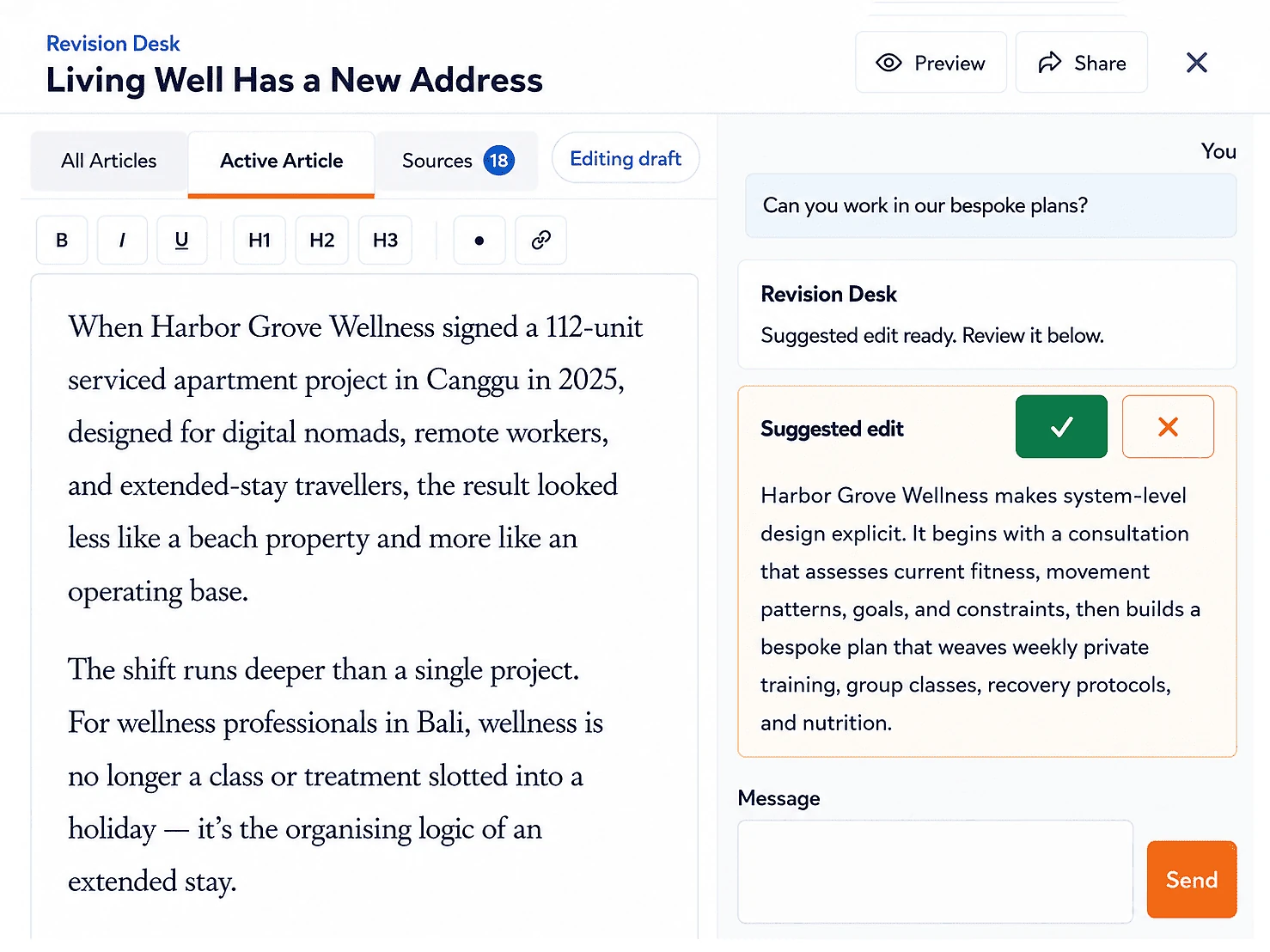
Instead of sending notes back and forth, you can open the draft inside Rank Engine, select the passage that needs work, request a focused revision, make direct edits when needed and approve the article when it is ready.
It is built for the part of the workflow where your input matters most: checking accuracy, tone, positioning, links, sources and stakeholder preferences before an article moves forward.
What you can do in Revision Desk
Revision Desk keeps review work close to the article itself.
You can:
- Read the active article in a clean preview.
- Highlight text and ask for an AI-assisted revision.
- Accept or reject suggested edits before they change the article.
- Switch into edit mode and make manual changes directly.
- Check sources, required links and media notes beside the article.
- Review previous versions in the article history.
- Approve the final version when the draft is ready.
Manual edits are always free. AI-assisted edits are separate: each article includes 10 free AI-assisted edits, and additional AI-assisted edits use your account balance.
Team review without conflicting edits
Revision Desk also works with Rank Engine team accounts.
Team members who have access to the order can open the article review under their own login. Only one person can be the live editor for the order at a time, which prevents overlapping edits and unclear drafts.
The first eligible person to enter edit mode becomes the live editor. Other active viewers stay in Preview mode with the Edit button disabled and a notice showing who is editing. Viewer avatars show who is currently in the article, and the live editor can hand editor control to another active viewer when it is time for someone else to take over.
Read-only viewers do not see unsaved keystrokes. After the live editor saves a draft, their preview refreshes to the latest saved version automatically.
When to use AI-assisted edits
AI-assisted edits work best for targeted changes, not open-ended rewrites.
Good requests are specific:
- "Replace this claim with our latest product positioning."
- "Mention our client work in this paragraph."
- "Add a short explanation of this acronym."
- "Bring this example closer to the healthcare market."
- "Swap this detail for the point in our brief."
The edit is generated with the article context, source material, required links and project settings in mind. You still decide whether the suggestion should be accepted.
When to edit manually
Use manual editing when you already know the exact wording you want.
That might mean correcting a product name, adjusting a sentence, changing a link, removing a phrase or tightening a paragraph. Manual edits are useful for small, precise fixes where asking for an AI suggestion would add unnecessary steps.
Preview mode stays available whenever you want to check the article without edit styling.
Sources, links and media stay visible
Article approval is not only about wording.
Revision Desk includes a Sources area for the material behind the article. You can review the news items, expert insights, studies, research notes, source URLs, required links and media inputs that informed the draft without leaving the review workspace.
If a link needs adjustment, you can edit it inside the article editor by selecting text, opening the link tool and choosing or entering the right URL.
Approval and rejection stay simple
When the article is ready, approve it from Revision Desk.
If edits were made, Rank Engine creates the updated article document for the publishing workflow. If the article is approved unchanged, the existing version can continue forward without unnecessary duplication.
If the article does not meet expectations because the thesis, direction or core angle is wrong, you can reject it instead. That escalates the article to your account manager, and we use your feedback to produce a replacement rather than trying to patch a draft that is headed in the wrong direction.
The goal is a shorter path from draft to approved article: review the content, make the changes that matter, coordinate with your team and approve the version you want us to use.